Issue #1 — Admin product save taking 3+ minutes
Symptoms
- Saving a product in the admin panel took over 3 minutes before the page reloaded
- All other admin forms (users, texts, orders) saved instantly
- The delay occurred regardless of browser, device, or whether JavaScript was enabled
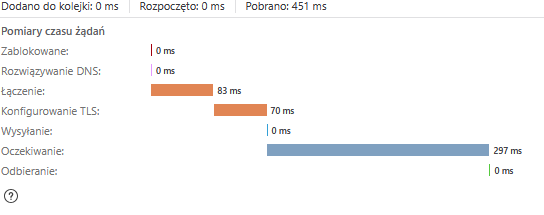
- PHP debug logs showed the entire PHP execution completing in milliseconds — the delay was happening before PHP even started
Investigation
A systematic elimination process was followed:
- ❌ PHP session locking — ruled out (
session_write_close() was already in place, and removing session_start() made no difference) - ❌ FCKeditor blocking form submit — ruled out (disabling JS had no effect; only one network request was active)
- ❌ Large POST data — ruled out (a test form with equivalent data submitted instantly)
- ❌ PHP-FPM worker starvation — ruled out (separate pools per user, multiple workers available)
- ❌ Database queries (
getRecords, news_change_temp) — ruled out via timestamps (all executed in milliseconds)
Root Cause
ModSecurity / Imunify360 WAF — Rule #77391379: “Possible XSS in arguments”
The Imunify360 WAF was scanning the HTML content submitted via FCKeditor (product description fields) and flagging it as a potential XSS attack. Although AccessDenied: false (the request was not blocked), the WAF scan itself took approximately 3 minutes and 31 seconds before passing the request through to Apache/PHP.
This was confirmed in /var/log/imunify360/console.log:
Rule:77391379  IM360 WAF: Possible XSS in arguments
Domain: www.datalandhobby.pl
Uri: /admin/index.php  HttpMethod: POST
The timeline from debug logs confirmed it:
14:52:11  [PHP] before form->validate  ← page loaded, form ready
                                        ← "Save" clicked
                                        ← 3 min 31 sec silence
14:55:43  [PHP] ENGINE START           ← PHP finally receives the POST
Fix
ModSecurity was disabled specifically for the datalandhobby.pl domain via cPanel → ModSecurity → Domains → Disable.
This preserves WAF protection for all other domains on the server while allowing the admin panel HTML content to pass through without scanning delays.
Issue #2 — Newly uploaded product photos rendering as black images
Symptoms
- Uploading a new photo to a product resulted in a black image being displayed
- All previously existing photos displayed correctly
- The upload process completed without errors
- Files were being created on disk with correct filenames and reasonable file sizes
Investigation
- Checked directory permissions (
/photos/prods/) — correct (mojed:mojed, writable) - Confirmed GD library supports JPEG (
JPEG Support => 1) - Added timing logs to
process_photo() — function executed in 13ms, all 8 size variants generated identify on generated files showed Type: Bilevel on the largest variant- Examined the
process_photo() function in support_func.inc.php
Root Cause
imagedestroy($src_img) was called inside the foreach loop instead of after it.
The source image resource (`srcimg‘)wasbeingdestroyedaftergeneratingthe∗first∗sizevariant.Forallsubsequent7variants,‘src_img`) was being destroyed after generating the *first* size variant. For all subsequent 7 variants, ` srcimg‘)wasbeingdestroyedaftergeneratingthe∗first∗sizevariant.Forallsubsequent7variants,‘src_img` was already freed from memory, causing `imagecopyresampled()` to operate on an invalid resource and produce black images.
php
// BROKEN — src_img destroyed after first iteration
foreach ($sizes_array as $size_name => $size_dim) {
    // ... generate resized image ...
    imagedestroy($src_img);  // ← destroys source on first loop!
    imagedestroy($dst_img);
}

// FIXED — src_img destroyed after all iterations complete
foreach ($sizes_array as $size_name => $size_dim) {
    // ... generate resized image ...
    imagedestroy($dst_img);
}
imagedestroy($src_img);  // ← correct placement
Fix
Moved imagedestroy($src_img) to after the foreach loop in support_func.inc.php.
Issue #3 — Newly uploaded photos not appearing in the product edit form after save
Symptoms
- After uploading a photo and saving the product, the redirect returned to the edit form
- The photo file existed on disk and was correctly generated
- The photo slot in the edit form appeared empty (no thumbnail, no delete checkbox)
- Only after a second save/reload would the photo sometimes appear
Investigation
Reviewed the photo upload flow in edit_engine.php. The update of the p_has_photos database field (which tracks which photo slots are occupied) was located after an exit() call — making it unreachable dead code.
php
// BROKEN
header("Location: ...");
exit();                          // ← execution stops here
if ($all_photos_ok) {
    $db->autoExecute(..., array("p_has_photos" => ...), ...);  // ← never reached
}
Root Cause
Dead code — database update for p_has_photos placed after exit().
The p_has_photos field stores a bitmask string indicating which photo slots contain images. Since it was never updated after a successful upload, the template had no way to know a new photo existed, so it rendered the slot as empty.
Fix
Moved the p_has_photos database update to before the header() redirect and exit() call in edit_engine.php:
php
// FIXED
if ($all_photos_ok) {
    if ($max_images != 0) {
        $db->autoExecute($dbpref.$table, array("{$tablep}_has_photos" => $vals[$tablep.'_has_photos']), DB_AUTOQUERY_UPDATE, "{$table_id} = $id");
    }
}
session_write_close();
header("Location: ...");
exit();
Summary
| # | Problem | Root Cause | Fix |
|---|
| 1 | 3-minute delay on product save | Imunify360 WAF scanning FCKeditor HTML as XSS | Disabled ModSecurity for domain in cPanel |
| 2 | Uploaded photos render black | imagedestroy($src_img) inside resize loop | Moved imagedestroy to after the loop |
| 3 | Photos not shown after upload | p_has_photos DB update placed after exit() | Moved DB update before redirect |